EchoBubble review: In-chat translations for WhatsApp Web conversations
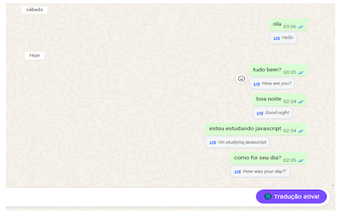
EchoBubble, developed by Casagrande Dev (Renan Casagrande), is a Chrome extension that brings real-time translation directly into WhatsApp Web to help multilingual conversations. It translates messages inline and displays the result beneath the original, reducing the need to switch to external translators. The extension supports 27 languages, saves language preferences automatically, and offers a one-click toggle for control. It targets travelers, language learners, and professionals needing quick comprehension in desktop messaging workflows, with a privacy-focused design that does not save chat history.
How EchoBubble embeds translation into chat without leaving WhatsApp Web
The extension inserts translations directly into the WhatsApp Web interface, using a discrete bubble placed below the original message to keep the source text visible. That arrangement eliminates manual copy-and-paste to external services and keeps conversational context in view. For practical workflows this means faster turn-taking in multilingual threads, since translations appear inline rather than in a separate tab or window.
How it behaves during active conversations and quick toggling
Real-time translation and a one-click control simplify selective use. The tool translates messages as they arrive and includes a single control to activate or deactivate translations, so users can pause the feature when it is not needed. Language choices and preferences are saved automatically, which reduces repetitive setup for recurring contacts and sessions on the same desktop browser.
What the extension does with message data and third-party services
Privacy is implemented through local handling and limited external processing. The developer states that the extension does not store chat history on its own servers, and translations are processed only when necessary via a public translation service. That design reduces persistent storage of conversations on the developer side while relying on an external API for linguistic processing.
Which setups and users get the most from this utility
Compatibility focuses on Chromium-based desktop browsers and quick conversational use. The extension is available for Google Chrome, Microsoft Edge, and other Chromium browsers, making it a desktop-first tool for people who use WhatsApp Web. The stated audience includes international travelers, language learners, and professionals who need immediate comprehension rather than document-level translation, and the extension is in an early adoption phase with limited public ratings.
A practical desktop aid for casual multilingual chats with a narrow trade-off
EchoBubble is a practical option for WhatsApp Web users who prioritize fast, conversational comprehension on desktop. It suits people who need immediate sense-making rather than formal translation accuracy; reviewers should expect translation quality to depend on the public service the extension calls. For technical or legally sensitive messages, pair the extension with a dedicated translation workflow to verify correctness before relying on a message verbatim.